How to Subscribe to Meta Verified and Get Instagram Blue Check
ARNKRMedia – Instagram is one of the most popular social media platforms in the world, with over 1.4 billion monthly active users. It’s also a powerful tool for building your personal or business brand, as it allows you to showcase your products, services, personality, and values to your target audience.
However, with so many users and accounts on Instagram, it can be hard to stand out from the crowd and establish your credibility and authority. That’s where the Instagram blue check comes in handy.
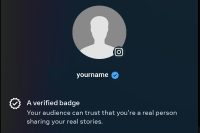
The Instagram blue check is a verification badge that appears next to the account name, as well as in searches and when the account owner comments on posts. It indicates that Instagram has confirmed that the account is authentic and represents a well-known person, brand, or organization.
The blue check is not only a symbol of prestige and recognition, but also a way to protect your account from impersonation and fraud. It also helps you gain more exposure and trust from your followers and potential customers.
But how do you get verified on Instagram and earn the blue check? In this article, we’ll explain everything you need to know about the verification process, the benefits of having the badge, and how to subscribe to Meta Verified, a new service that makes it easier to get verified on Instagram.
What is Meta Verified?
Meta Verified is a subscription bundle that helps you establish your presence on Instagram, Facebook, and Threads. It offers verification with a government ID, proactive account protection, access to direct account support, and exclusive features and perks.

Meta Verified was launched by Meta (formerly Facebook) in April 2023 as a way to provide more value and security to its users. Meta Verified is available on Instagram and Facebook in select regions. It is for people 18 years or older and is not yet available for businesses.
Meta Verified costs USD $11.99 when you subscribe on web or USD $14.99 when you subscribe in the app. Features, availability, and pricing may vary by region.
What are the benefits of Meta Verified?
Meta Verified has many advantages for your personal or business brand, such as:
- Verification: You can get verified on Instagram and Facebook with a government ID and where available a selfie video. This helps you prove your identity and authenticity to your followers and customers. The verified badge will also appear on Threads when you subscribe to Meta Verified on Instagram.
- Proactive account protection: You can get protection from impersonation with proactive account monitoring and secure your account with required two-factor authentication. This helps you prevent unauthorized access and fraud on your account.
- Exclusive features: You can get exclusive stickers on Stories and Reels across Facebook and Instagram, and where available 100 Stars a month on Facebook so you can show your support for other creators. These features can help you increase your engagement and reach on the platform.
- Direct account support: You can get help when you need it from a real person on common account issues that matter to you. This can help you resolve any problems or questions you may have about your account.
How do you subscribe to Meta Verified?

To subscribe to Meta Verified, you need to follow these steps:
- Open the Instagram app or Facebook web (www.) and go to your profile.
- Tap the menu icon in the top right corner and select Settings.
- Tap Account Center, then tap Meta Verified.
- If it’s available for your account, you will see Meta Verified available under your name and profile photo.
- Tap Subscribe Now and set up your payment method for your monthly subscription.
- Verify your identity with a government ID and where available a selfie video.
- Enjoy the benefits of Meta Verified on Instagram, Facebook, and Threads.

You can cancel your subscription at any time from the Account Center settings.
How do you increase your chances of getting verified on Instagram?
Even if you subscribe to Meta Verified, there is no guarantee that you will get verified on Instagram. Instagram has strict criteria and guidelines for granting the badge. According to Instagram’s help center, to apply for verification, you must meet the following requirements:
- Your account must represent a real person, registered business or entity.
- Your account must be the unique presence of the person or business it represents. Only one account per person or business may be verified, with exceptions for language-specific accounts.
- Your account must be public and have a bio, profile photo and at least one post.
- Your account must follow Instagram’s terms of service and community guidelines.
In addition to these requirements, Instagram also considers four factors when evaluating verification requests: authenticity, uniqueness, completeness, and notability.
- Authenticity: Your account must represent a real person, entity or business that is verifiable through official documents or media coverage.
- Uniqueness: Your account must be the only presence of its kind on Instagram. Generic accounts (e.g., @puppies) or fan accounts (e.g., @justinbieberfans) are not eligible for verification.
- Completeness: Your account must be public, active, and have a clear bio, profile photo, and at least one post. You should also link your Instagram account to other official websites or social media accounts.
- Notability: Your account must represent a well-known person, brand or organization that is highly searched for or featured in multiple news sources. Paid or promotional content does not count as news sources.
If you think you meet these criteria and want to apply for verification, you can follow these steps:
- Open the Instagram app and go to your profile.
- Tap the menu icon in the top right corner and select Settings.
- Tap Account and then Request Verification.
- Fill out the form with your full name, account name, category, and a photo of your government-issued ID (e.g., driver’s license, passport, national identification card) or official business documents (e.g., tax filing, utility bill, article of incorporation).
- Tap Send and wait for Instagram’s response.
You will receive a notification from Instagram whether your request is approved or denied. The verification process may take a few days or weeks, depending on the volume of requests. If your request is denied, you can reapply after 30 days.
What are some common mistakes to avoid when applying for verification on Instagram?
Applying for verification on Instagram can be a challenging and frustrating process, especially if you don’t know what to expect or what to avoid. Here are some common mistakes that can ruin your chances of getting verified on Instagram:
- Applying too soon or too often. You should only apply for verification when you are confident that you meet all the criteria and have a solid online presence. Applying too soon or too often can make you look desperate or spammy, and may result in your request being rejected or ignored.
- Using fake or outdated documents. You should only use valid and current documents that match your account name and category when applying for verification. Using fake or outdated documents can make you look dishonest or fraudulent, and may result in your account being suspended or banned.
- Changing your account information after applying. You should not change any information on your account (e.g., name, username, bio, profile photo) after applying for verification. Changing your account information can confuse Instagram’s reviewers and make them doubt your authenticity or uniqueness.
- Paying for verification services or agents. You should not pay anyone who claims to be able to get you verified on Instagram for a fee. These services or agents are usually scams that will take your money and provide no results. They may also compromise your account security or violate Instagram’s policies.
Conclusion
Get Instagram Blue Check verified is not impossible, but it does require a lot of hard work and patience. By subscribing to Meta Verified, you can make the process easier and enjoy the benefits of having the blue check on your account.
Remember that get Instagram blue check verification is not an end goal in itself, but rather a means to an end. Verification is meant to help you protect your identity and brand, enhance your credibility and reputation, and boost your visibility and discoverability on the platform.
Ultimately, verification is not a measure of your success or worth as a person or a brand. What matters more is how you use Instagram to create value for yourself and your audience.

Interested in gadgets, technology, and coffee. Currently learning to write blogs and explore WordPress.